
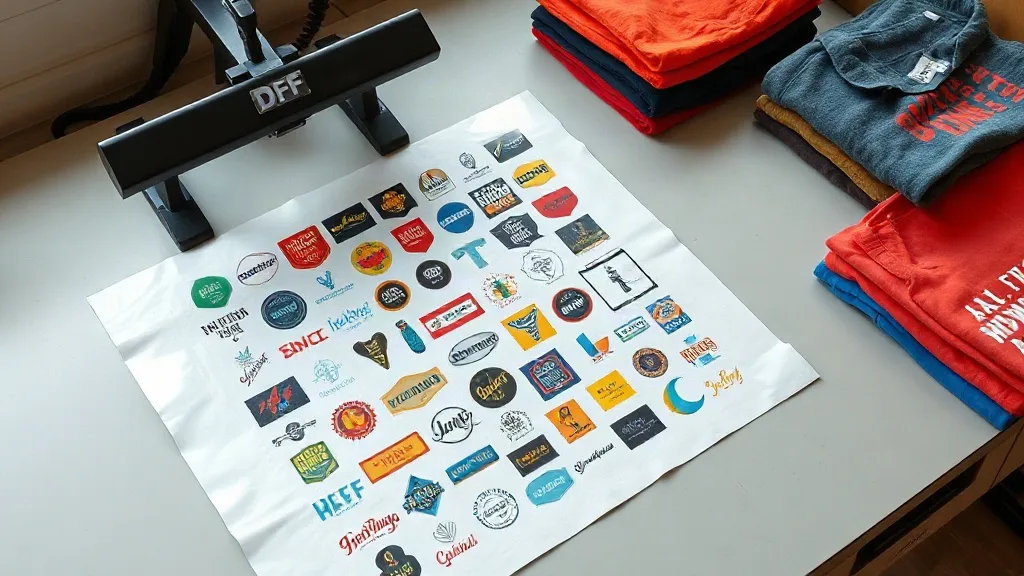
If you run a small apparel business or print on demand, you know the struggle: short runs can eat into your profits with setup fees and minimum order quantities. A DTF Gangsheet changes that equation. By grouping multiple designs onto a single transfer film, you get the efficiency of bulk printing without committing to large inventories. In this guide, we'll explore how gangsheets work, why they're a game-changer for small businesses, and how to use them effectively.
What Exactly Is a DTF Gangsheet?
DTF (Direct-to-Film) printing involves printing your design onto a special film, applying a powder adhesive, and then heat-pressing it onto fabric. A gangsheet takes this process a step further: it's a single sheet of film that contains multiple designs arranged together, like a collage. Instead of printing each design separately, you print them all at once, maximizing the use of the film and reducing waste.
Think of it as a digital sticker sheet for your garments. You can include various sizes, colors, and even different designs on one sheet, then cut them out as needed. This is especially handy for sample packs, mixed orders, or when you want to test new designs without committing to a full roll.
Why DTF Gangsheets Make Sense for Small Print Runs
Traditional screen printing requires separate screens for each color, which becomes costly for small batches. DTF printing eliminates that: no screens, no minimums. But even with DTF, printing one design at a time can be inefficient. Gangsheets solve that by letting you fill the sheet with as many designs as possible, spreading the fixed costs (like film and powder) across multiple items.
For example, if you have ten different t-shirt designs and need five of each, a gangsheet lets you print all fifty transfers on one or two sheets. You save on setup time, material waste, and shipping costs. Plus, you can easily adjust quantities without renegotiating with a printer.
Cost Efficiency in Action
Let's break it down. Suppose you order a gangsheet with 20 small designs. The per-design cost drops significantly compared to ordering each separately. You're paying for the sheet area, not the number of designs. This is perfect for limited editions, event merchandise, or personalized gifts where you need variety but not volume.
How to Prepare Your Artwork for a Gangsheet
Getting your gangsheet right starts with the artwork. Here are key steps to ensure a smooth print:
- Use vector or high-resolution files: 300 DPI at the final print size is recommended to avoid pixelation. If you're using raster images, make sure they're large enough.
- Arrange designs with spacing: Leave at least 0.25 inches between designs so they can be cut cleanly. Group similar colors together to simplify cutting.
- Mirror your designs: DTF transfers are applied face down, so your artwork must be mirrored horizontally. Most design software has a flip option.
- Include a cut line layer: Some printers require a separate layer with cut lines. Check your printer's guidelines; if not, you'll cut manually.
Pro tip: Create a template with common sizes (e.g., 4x4, 8x10) and place your designs within those boundaries. This makes cutting faster and more consistent.
Choosing the Right Gangsheet Size and Layout
Gangsheets come in various widths, typically from 12 to 24 inches, and lengths up to several feet. The goal is to fill the sheet area efficiently. Here's how to decide:
- Calculate total area: Add up the square inches of all designs you need. Then choose a sheet size that accommodates them with minimal leftover space.
- Consider design orientation: Mix portrait and landscape designs to fill gaps.
- Plan for cutting: If you're using a cutting machine, ensure your designs are aligned to the grid or include registration marks.
Many DTF printers offer online gangsheet builders where you can drag and drop designs, see the layout, and get instant pricing. This takes the guesswork out of sizing.
Applications Beyond T-Shirts
While t-shirts are the most common use case, DTF gangsheets work on a wide range of fabrics and items. Here are some creative applications:
- Hoodies and sweatshirts: DTF adheres well to cotton blends and polyester, making it ideal for cozy apparel.
- Tote bags: Canvas totes take transfers beautifully; just adjust pressing time for thicker materials.
- Aprons and uniforms: Add logos or names to staff aprons without ordering in bulk.
- Home textiles: Personalize pillowcases, tea towels, and more with small designs.
Because DTF doesn't require a special coating on the fabric, you can experiment with different materials. Just be mindful of heat sensitivity; synthetic fabrics may require lower temperatures.
Common Pitfalls and How to Avoid Them
Even with a great gangsheet, mistakes can happen. Watch out for these:
- Overcrowding: Placing designs too close can lead to cutting errors or peeling edges. Always maintain spacing.
- Inconsistent pressure: When pressing multiple designs, ensure even pressure across the sheet. Use a heat press with a large platen if possible.
- Ignoring fabric compatibility: Always test on a scrap piece first. Some fabrics may require different pressing parameters.
- Poor color management: Convert your designs to CMYK or use ICC profiles provided by your printer to avoid color shifts.
Also, store unused transfers in a cool, dry place away from direct sunlight. They can last for months if properly stored.
Maximizing Your Gangsheet Investment
To get the most out of your gangsheet, consider these strategies:
- Combine orders: If you sell online, batch orders from the same week into one gangsheet to save on shipping and materials.
- Offer variety packs: Create themed gangsheets (e.g., "Funny Quotes Pack") and sell them as ready-to-press transfers to other crafters.
- Use offcuts: Small leftover areas can be filled with tiny designs like logos or icons; don't let them go to waste.
- Track your costs: Keep a spreadsheet of sheet costs, design counts, and press time to calculate your true cost per item.
By treating your gangsheet as a strategic tool, you turn a simple transfer into a profit center.
Frequently Asked Questions
How many designs can I fit on a DTF gangsheet?
It depends on the sheet size and design dimensions. A 12x12 inch sheet can hold about nine 3x3 inch designs with spacing. Use an online gangsheet builder to visualize your layout and maximize usage.
Can I mix different fabric types on one gangsheet?
Yes, but you'll need to adjust pressing settings for each fabric during application. The gangsheet itself is printed on one film, so it's fine to have designs destined for different materials.
What file format is best for gangsheet artwork?
PDF, AI, or EPS files are preferred for vector designs. For raster images, use PNG or TIFF at 300 DPI. Always mirror the design and include a cut line layer if required.
How do I cut a gangsheet without a cutting machine?
Use sharp scissors or a rotary cutter with a straight edge. Print a faint outline around each design as a guide. Take your time to ensure clean edges for professional results.
Do DTF gangsheets work on dark fabrics?
Absolutely. DTF transfers include a white ink base that makes colors pop on dark materials. Just ensure the white layer is thick enough; most printers handle this automatically.
Ready to give it a try? Start by gathering a few designs you'd like to test, arrange them in a gangsheet template, and order from a reputable DTF printer. You'll quickly see how this approach simplifies your workflow and boosts your bottom line.