
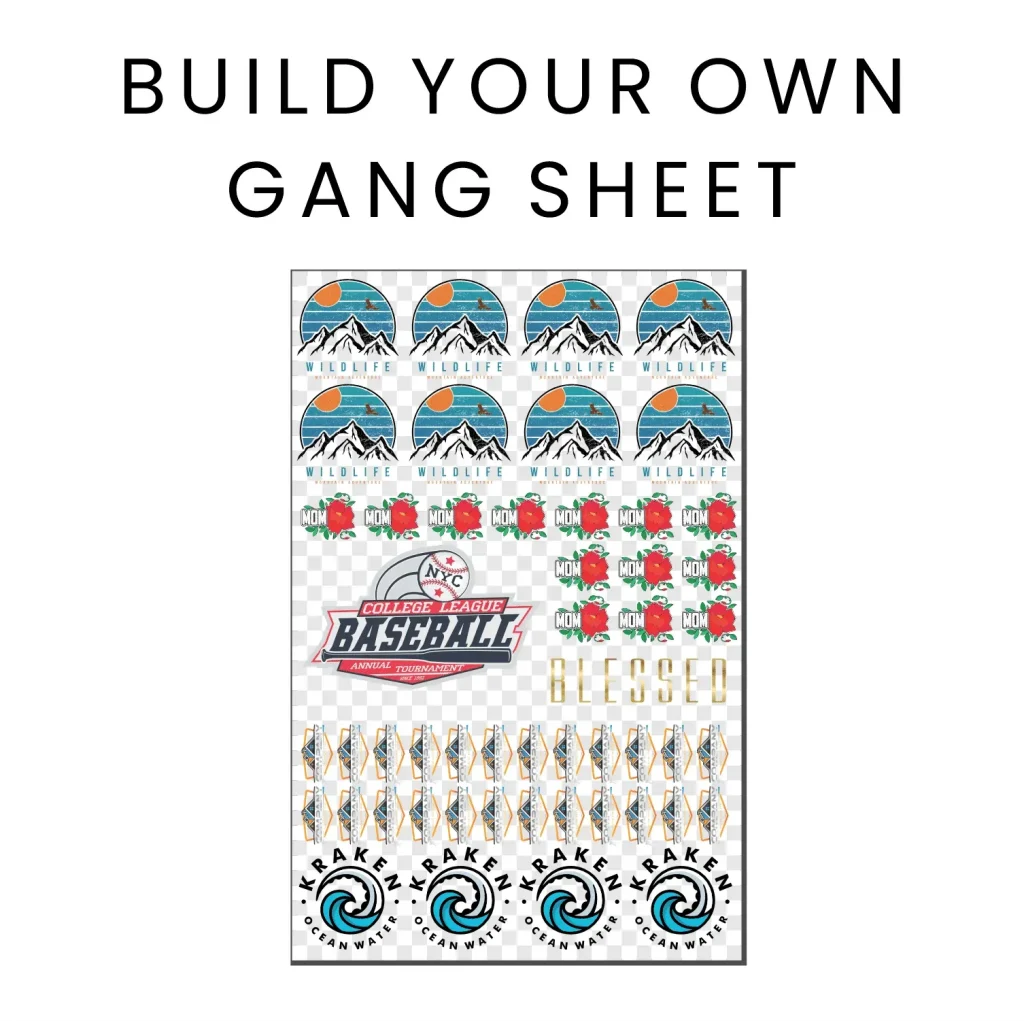
In the vibrant realm of custom printing, the DTF Gangsheet Builder emerges as a game-changer, enabling creators to bring their visions to life with unprecedented efficiency. This innovative tool revolutionizes DTF printing by allowing users to arrange multiple designs on a single sheet, maximizing productivity while ensuring the highest quality. Throughout this article, you will discover a detailed walkthrough of the DTF Gangsheet Builder, alongside essential tips for optimizing your printing outcomes. Whether you’re a seasoned professional or a novice exploring custom apparel design, utilizing the DTF Gangsheet Builder can significantly enhance your projects. Join us as we explore the ins and outs of this powerful software and set the stage for your creative journey into gangsheet printing.
When it comes to crafting unique custom prints, the Direct to Film (DTF) Gangsheet Creator proves to be an indispensable resource for designers and manufacturers alike. This advanced application simplifies the process of generating multiple prints simultaneously, reflecting a growing demand for efficient production solutions. In this guide, we will unravel the functionalities of the DTF Gangsheet Creator, offering a comprehensive tutorial that encompasses everything from initial design preparation to final printing techniques. Whether referred to as a gangsheet planner or a DTF design builder, the effectiveness of this tool in streamlining print processes cannot be overstated. Prepare to dive into a world where creativity meets efficiency in custom printing!
Why Choose DTF Printing for Custom Apparel?
DTF printing, or Direct to Film printing, has revolutionized the custom apparel industry by offering unparalleled clarity and detail. Unlike traditional methods such as screen printing, DTF allows for vibrant colors and intricate designs to be transferred onto fabric without the limitations of screen mesh. This process involves printing designs onto a special film, using high-quality inks, which are then heat-pressed onto garments. This not only provides a durable finish but also maintains the soft feel of the fabric, ensuring that the designs will last wash after wash.
Moreover, DTF printing supports a wide range of materials, from cotton and polyester to blends, making it versatile for various apparel types. This adaptability opens up opportunities for fashion brands, small businesses, and individual artists looking to create custom designs with minimal overhead and waste. By reducing the need for large quantities of inventory, DTF printing allows for more creativity and flexibility in design, ultimately presenting a cost-effective solution for tailored apparel solutions.
Understanding Key Concepts of Gangsheet Printing
Gangsheet printing is an innovative approach that optimizes the use of printing space by arranging multiple designs onto a single sheet. This method significantly reduces ink and material waste, leading to cost savings and more efficient production processes. Artists and designers can utilize gangsheet printing to create a large number of individual designs simultaneously, streamlining the workflow and reducing turnaround time.
By grasping the concepts of gangsheet printing, users can leverage tools like the DTF Gangsheet Builder to maximize their production capabilities. This entails properly sizing and ensuring that each design fits seamlessly on the gangsheet, offering a polished final product. The effective use of this technique can dramatically increase output, especially for businesses handling bulk clothing orders or custom items, thereby elevating their competitive edge in the market.
Step-by-Step Guide to Mastering the DTF Gangsheet Builder
The DTF Gangsheet Builder simplifies the process of creating complex designs by providing an intuitive platform for users. Starting from preparing your designs in compatible formats like PNG or TIFF, it’s crucial to have high-resolution images to ensure quality prints. Once you have your artwork ready, open the software and familiarize yourself with its user-friendly interface. This initial step is vital in making the most out of the builder’s features.
After accessing the builder, you’ll be guided through a series of straightforward steps. Uploading designs is seamless, and arranging them on the canvas becomes an enjoyable task with alignment tools at your disposal. The capability to adjust spacing and size is critical for achieving an optimal layout. Completing this step thoroughly allows for a striking visual impact once printed, illustrating the power of DTF technology in creating stunning custom apparel.
Optimizing Your Prints with Advanced Features
Once you’ve uploaded your designs in the DTF Gangsheet Builder, it’s time to focus on print optimization. This entails adjusting settings such as size, resolution, and spacing, which are crucial to achieving the best final product. Utilizing the optimization features available in the builder, you can fine-tune how images are organized to minimize ink waste and produce vibrant prints. These adjustments not only enhance the clarity of your designs but also ensure that they meet the specific requirements of your printing setup.
In addition, it’s essential to program the DTF printer settings according to the materials you’ll use. Understanding how these specifications influence print quality can significantly impact the results. By taking full advantage of the print optimization features found in the DTF Gangsheet Builder, users can enjoy efficient printing processes while maintaining the highest standards of quality and clarity in their custom apparel designs.
Troubleshooting Common Issues in DTF Printing
Despite the ease of use that the DTF Gangsheet Builder offers, users may encounter common issues while printing. Issues like color inaccuracies or misalignment during the transfer process can arise, potentially affecting the final output. One effective way to troubleshoot these problems is to carry out a test print before committing to a full run. This practice allows designers to identify and rectify any issues early on, saving time and resources.
Furthermore, if you notice inconsistencies in colors, adjusting settings like saturation and ink density within the DTF Gangsheet Builder can yield better results. Engaging with community forums for DTF printing can also provide beneficial insights and shared solutions from experienced users helps new designers navigate potential challenges.
Resources for Enhancing DTF Printing Skills
As the DTF printing landscape continues to evolve, there’s a wealth of resources available to help users improve their skills. Online tutorials, YouTube videos, and dedicated blogging platforms can provide users with the latest tips and techniques. For instance, the Printavo blog routinely posts valuable insights into the latest developments in DTF printing technology and best practices for utilizing the DTF Gangsheet Builder.
Additionally, joining online communities and forums can be incredibly beneficial. Users can share their experiences, discuss troubleshooting techniques, and learn from one another in these collaborative spaces. Following industry influencers and subscribing to relevant channels can also keep enthusiasts updated on new techniques, enabling them to enhance their custom apparel design capabilities through ongoing education.
Frequently Asked Questions
What is the DTF Gangsheet Builder and how does it work?
The DTF Gangsheet Builder is a specialized tool used for Direct to Film (DTF) printing that allows users to create multiple designs on a single sheet, optimizing the printing process. It features a user-friendly interface for uploading, arranging, and resizing images, making it ideal for custom apparel design.
How do I get started with DTF printing using the Gangsheet Builder?
To get started with DTF printing using the Gangsheet Builder, prepare your designs in compatible formats such as PNG or TIFF. Then, access the builder, upload your designs, arrange them on the canvas, adjust print settings, and preview before printing.
What key features should I look for in a DTF Gangsheet Builder?
When choosing a DTF Gangsheet Builder, look for features like a user-friendly interface, print optimization settings, batch processing capabilities, and compatibility with various printer types and file formats, all of which enhance the efficiency and quality of your custom apparel designs.
Can the DTF Gangsheet Builder be used for batch printing?
Yes, the DTF Gangsheet Builder is designed to facilitate batch printing. This feature allows users to print multiple designs on a single sheet without compromising the quality, making it a great choice for businesses that require high-volume printing.
How can I optimize my designs for better results with the DTF Gangsheet Builder?
To optimize your designs using the DTF Gangsheet Builder, ensure you use high-resolution images, adjust spacing and layout settings within the builder, and always preview your gangsheet before the final print to identify any issues with color or sizing.
Are there tutorials available for using the DTF Gangsheet Builder effectively?
Yes, there are various resources available, including video tutorials on platforms like YouTube and instructional articles on blogs like Printavo. These resources provide step-by-step guidance on how to use the DTF Gangsheet Builder for achieving stunning custom apparel designs.
| Feature | Description |
|---|---|
| User-Friendly Interface | Intuitive layout for easy navigation and use. |
| Print Optimization | Adjusts spacing and layout for high-quality output. |
| Batch Processing | Enables processing of multiple designs efficiently. |
| Versatile Compatibility | Works with various printer types and file formats. |
Summary
The DTF Gangsheet Builder is an essential tool for anyone looking to create impressive designs in the custom printing sector. By utilizing its user-friendly interface, print optimization features, and batch processing capabilities, designers can efficiently manage their artwork and produce high-quality prints. Staying informed about the latest developments and seeking community support allows users to maximize their potential with the DTF Gangsheet Builder, ensuring they achieve stunning and professional results.