
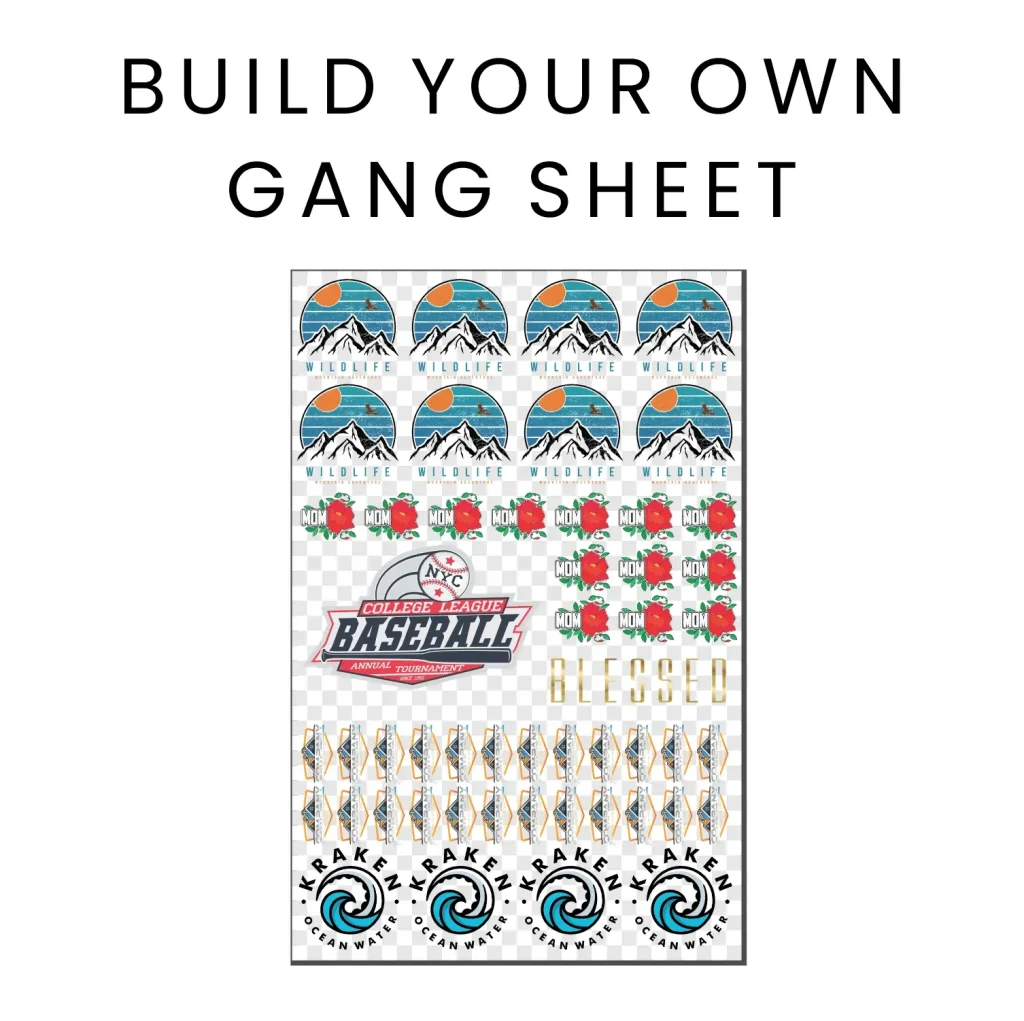
Are you ready to revolutionize your textile printing process? The DTF Gangsheet Builder is your ultimate solution for creating beautiful, efficient prints using Direct-to-Film (DTF) technology. This innovative tool simplifies the design preparation process by allowing you to batch multiple designs onto a single gang sheet, maximizing productivity and minimizing waste. In this guide, we will delve into the essential steps of mastering DTF printing, helping you understand print settings and heat press applications to achieve pristine results. By leveraging the capabilities of the DTF Gangsheet Builder, you can transform your printing game and produce high-quality apparel with ease.
When it comes to the world of printing, especially regarding Direct-to-Film applications, having the right tools at your disposal is crucial. The DTF sheet creator, often referred to as a gang sheet generator, enables users to compile multiple designs on one page for efficient printing. This method, known for reducing ink and material waste, ensures each project is economically viable and visually appealing. By mastering design composition and optimizing print configurations, you stand to drastically enhance your production workflow. Dive into this tutorial, where we will explore the steps to efficiently utilize the gang sheet concept, ensuring high-quality output for all types of garments.
Understanding DTF Printing Technology
DTF printing, or Direct-to-Film printing, uses a specialized process that allows for stunning designs to be transferred onto textiles. This innovative technique is gaining traction because it offers vibrant colors, fine details, and great durability. The process involves printing designs on a specialized film using high-quality inks, which are then heated and pressed onto garments. With its capability to produce multiple designs on a single sheet, DTF printing significantly enhances productivity for printing professionals.
One of the standout features of DTF printing is its flexibility in application. It can be used on a variety of materials including cotton, polyester, and blends, providing a versatile solution for different fabric types. Additionally, the ability to utilize gang sheets means that printers can effectively maximize their material usage while reducing waste—a significant cost-saving benefit. This makes DTF not just a practical option but also an environmentally friendly choice in the textile printing industry.
Preparing for Design with the DTF Gangsheet Builder
To create effective gang sheets with a DTF Gangsheet Builder, proper design preparation is key. It starts with choosing the right software, such as Adobe Illustrator or CorelDRAW, allowing for precise layout adjustments and high-resolution designs. The ability to manipulate design elements, layer graphics, and size them appropriately ensures that the final gang sheet maximizes space without compromising quality. Having a clear plan for your designs not only streamlines the printing process but also enhances the overall aesthetic appeal of the final product.
Another crucial aspect of preparation is understanding the dimensions of your gang sheets. Printers typically have set formats they can accommodate, ranging from A4 to larger rolls. Ensuring your designs fit well within these dimensions while clustering them intelligently can significantly reduce waste. Furthermore, consider saving your files in formats like PNG or PDF with transparent backgrounds to maintain quality and vibrancy during the printing process. This meticulous preparation lays a solid foundation for successful DTF printing.
Optimizing Print Settings for DTF Printing
Once design preparation is complete, the next step involves configuring your printer for optimal results. Each DTF printer may have different specifications, but selecting a high-quality print mode is vital. This ensures that your gang sheets display stunning colors and intricate details. Utilize settings that are specifically tailored for DTF applications to enhance color output and prevent issues like smudging or fading once transferred to the fabric.
In addition to print mode, the choice of ink and transfer paper plays a pivotal role in achieving a successful print. Always ensure compatibility between your ink type and transfer media to avoid complications during the application phase. Running test prints will also help in assessing color accuracy and image alignment. Making adjustments based on these test prints can save you from larger problems later on, streamlining the journey from design to finished garment.
Executing the Printing Process Efficiently
With preparations complete, executing the printing process requires careful attention. Start by ensuring your printer nozzle is clean to ensure optimal ink flow. Clogged nozzles can jeopardize print quality and lead to wasted materials due to unsatisfactory results. Additionally, loading your transfer paper correctly aligns with the printer’s specifications, which prevents jams and misprints, thereby ensuring that each gang sheet comes out perfect.
Once all systems are in place, execute the print job and allow the printer to do its work. Monitor the job closely to catch any issues early, such as misalignment or ink irregularities. Staying attentive during this phase will save time and resources, ensuring that when your gang sheet is completed, it is ready for the next steps of heat press application.
Mastering the Application of DTF Transfers
The application of DTF transfers to garments is a critical step that influences the final quality of the product. Begin by preparing your heat press according to the manufacturer’s recommendations for temperature and time settings specific to the transfer paper used. It’s essential to adhere to these guidelines to ensure proper adhesion and vibrant heat-set colors. The optimal temperature typically hovers around 320°F (160°C), but verifying with the specifics of your materials is key.
When positioning the gang sheet on the garment, alignment is crucial for achieving a professional look. Ensuring that designs do not overlap improperly will secure a clean and attractive finish. After placing the sheet, applying the right amount of heat and pressure is critical for a successful transfer. Once the heat press has completed its cycle, carefully peel the sheet to reveal the crisp designs that have set beautifully onto the fabric, marking the completion of your DTF printing process.
Final Thoughts on Utilizing DTF Gang Sheet Builders
Creating flawless designs with a DTF Gangsheet Builder significantly enhances productivity in the printing process. By following properly outlined steps from design preparation through to application, one can reap the benefits of efficiency, reduced waste, and superior quality. DTF printing not only caters to the artistic visions of creators but also allows for practical application across diverse fabric types, making it an ideal method for garment printing.
As you hone your skills with DTF gang sheets, remember that practice makes perfect. Continue experimenting with different designs and optimization techniques to achieve the best results. Mastery of DTF printing, coupled with a comprehensive understanding of gang sheet creation, will undoubtedly elevate your printing capabilities, cater to various markets, and potentially increase your revenue in the textile printing domain.
Frequently Asked Questions
What is a DTF Gangsheet Builder and how does it function?
A DTF Gangsheet Builder is a specialized tool designed to create efficient layouts for Direct-to-Film (DTF) printing. It allows users to arrange multiple designs on a single sheet, maximizing use of space and minimizing waste. The builder simplifies the design preparation process, ensuring that artworks are optimally placed for high-quality prints.
How do I prepare my designs using a DTF Gangsheet Builder?
To prepare your designs with a DTF Gangsheet Builder, start by determining the size of your gang sheet. Then, arrange your designs in a way that clusters smaller artworks together, leaving margins for cutting. Save your files in compatible formats like PNG or high-resolution PDF to ensure vibrant colors in the final print.
What are essential print settings for DTF printing with gang sheets?
When using a DTF Gangsheet Builder, it is crucial to select the appropriate print mode on your DTF printer for high-quality color output. Ensure you are using the correct ink and transfer paper suited for your printer, and always print a test page to verify color accuracy and alignment before the final print.
How can I ensure successful heat press application of my DTF gang sheets?
To ensure successful heat press application of your DTF gang sheets, preheat your heat press to the recommended temperature of around 320°F (160°C) for 15-20 seconds. Properly position your gang sheet on the garment and apply firm pressure with the heat press. Always follow the manufacturer’s guidelines for best results.
What troubleshooting steps should I take if my DTF prints are not coming out correctly?
If your DTF prints are not coming out correctly, first check for clogged printer nozzles and run a cleaning cycle. Ensure that your print settings match the media type you are using, and verify that the design is correctly aligned on the gang sheet. Additionally, check that the ink and transfer paper are compatible with your DTF printer.
Can I use various designs on a DTF gang sheet?
Yes, the DTF Gangsheet Builder allows you to use various designs on a single gang sheet. This flexibility enables you to print multiple artworks simultaneously, making your DTF printing process more efficient and cost-effective while maintaining high-quality outputs.
| Step | Key Actions | Considerations |
|---|---|---|
| 1 | Design Preparation | – Determine size of gang sheet – Arrange designs effectively – Save in compatible formats like PNG or PDF. |
| 2 | Printer Settings | – Select high-quality print mode – Use compatible ink and transfer paper – Print test page for adjustments. |
| 3 | Printing Your Gang Sheet | – Clean printer nozzles – Load paper correctly – Monitor the printing process. |
| 4 | Application of Design | – Prepare heat press with recommended settings – Properly position gang sheet on garment – Apply heat and pressure for transfer. |
Summary
The DTF Gangsheet Builder is a revolutionary tool that empowers designers to create stunning and efficient prints across various apparel. By mastering the essential steps outlined in this tutorial—from preparing your designs to their final application—you can transform your printing workflow. The strategic use of gang sheets not only maximizes efficiency but also minimizes material waste, making it an indispensable practice in modern textile printing. Whether you are a novice or a seasoned professional, utilizing a DTF Gangsheet Builder will elevate your print quality and productivity, helping you achieve vibrant and flawless custom apparel.